A free incident report page on my homelab, and why Cloudflare stopped it
Small lab this time, and it did not finish. Still worth writing down.
Why an incident report page
I work remote with flexible hours. The project I maintain is used by internal company users during office hours, so when something breaks I am usually not looking. I wanted a page that collects errors from the app and pushes to my phone when a real incident happens, and stays quiet when 1 user hits 1 weird error once.
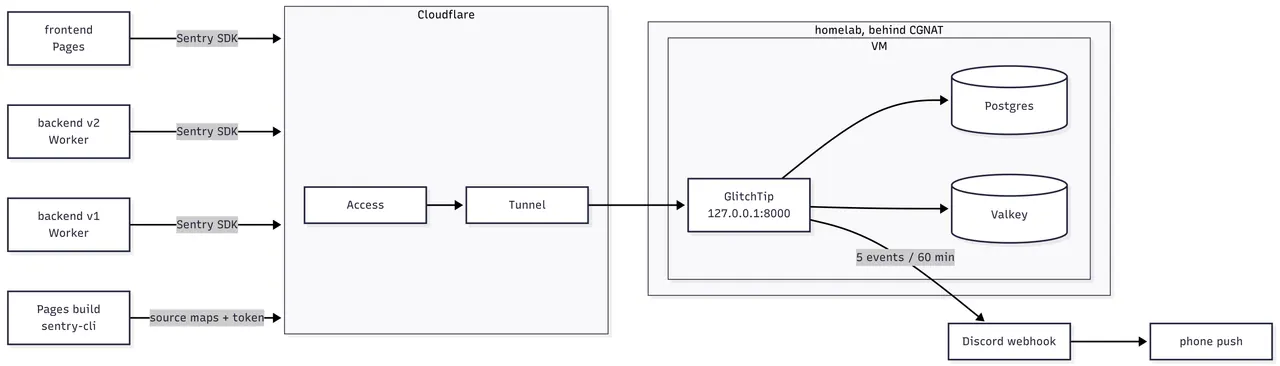
Free, of course, because they would not give me a budget. I also wanted an excuse to poke at on prem again after the homelab post. I went with GlitchTip. It speaks the Sentry protocol, so the apps use the normal Sentry SDKs, and it has a built in rule “N events of 1 issue in 60 minutes” that can post to a Discord webhook. Discord on the phone does the push, so I write 0 alert code.
Home internet in Vietnam sits behind CGNAT, so the box has no reachable public IP. The plan was Cloudflare Tunnel to get it online and Cloudflare Access to lock the UI. This is also the part that killed the lab later.
The VM template I could not log in to
In the homelab post I made an Ubuntu 22.04 VM template for future labs. I cloned it, booted it, and found out I forgot the username. Then I remembered I had also disabled password login, so only a key would get me in.
The key existed somewhere. Somewhere meant 4 computers and 1 phone. 3 hours later I found the file.
Picking an IP
Needed a free address on the LAN. A bash scan is enough:
for i in $(seq 1 254); do
  ping -c 1 -W 1 192.168.1.$i >/dev/null 2>&1 && echo "192.168.1.$i up"
done
I picked 192.168.1.24. No real reason, 12 times 2 is 24.
Set it as static, dropped my laptop public key into the VM, ssh works. From
here on this VM is called glitchtip.
Compose and setup script
I asked Claude Code to generate the compose file and a 1 shot setup script. I gave it the context it needed (GlitchTip version, which services, what should be reachable from where) and kept every secret out of the prompt. The output was close to usable on the first try.
The parts that matter:
services:
  postgres:
    image: postgres:18
    command: -c max_locks_per_transaction=512
  valkey:
    image: valkey/valkey:9
    command: valkey-server --requirepass ${VALKEY_PASSWORD}
  web:
    image: glitchtip/glitchtip:6.2.6
    ports:
      - "127.0.0.1:8000:8000"
    environment:
      SERVER_ROLE: all_in_one
      ENABLE_USER_REGISTRATION: "False"
      ENABLE_ORGANIZATION_CREATION: "False"
      GLITCHTIP_RETENTION_DAYS: "30"
A few choices in there were on purpose. The image tag is pinned, not
latest, so the alert behaviour I read in the source is the one I run. Web
is bound to 127.0.0.1 only, so nothing on the VM is reachable from the LAN
and the tunnel on the same box is the only door. Registration and org
creation are off, the owner account gets created offline by the script
before any public hostname exists. And Postgres has a real password, since
the sample compose ships with POSTGRES_HOST_AUTH_METHOD: trust.
The script writes the .env on first run, then pulls, migrates, creates the
superuser and brings everything up:
docker compose pull
docker compose up -d postgres valkey
docker compose run --rm web ./manage.py migrate
docker compose run --rm web ./manage.py createsuperuser
docker compose up -d
curl -sI http://127.0.0.1:8000/_health/ | head -1
Web port is loopback only, so I reached the UI through an ssh port forward:
ssh -L 8000:127.0.0.1:8000 glitchtipLogged in, created the org, then 7 projects.
Why 7 projects
The app is 3 deployables: the legacy backend (v1), the new backend (v2, see the migration post) and the frontend. Each has staging and prod. That is 6:
backend-v2-staging   backend-v2-prod
backend-v1-staging   backend-v1-prod
frontend-staging     frontend-prod
1 project per deployable per environment keeps the issue lists clean. An error in staging never shows up in the prod list, and the prod alert never fires because I broke staging on purpose. The cost is 6 alert rules to click through once.
The 7th is probe. No alert rule. An uptime monitor posts a fake event to it
every 60 seconds. If that request succeeds, the tunnel, the Access bypass,
the rate limit and GlitchTip ingestion are all alive. Without it, a dead
ingest path looks exactly like a day with 0 errors.
Why 2 tokens, before touching Cloudflare
The frontend is built and deployed by Cloudflare Pages. Browser stack traces
are minified garbage unless the source maps get uploaded to GlitchTip at
build time. sentry-cli inside the Pages build does that upload, and it
needs an auth token.
So in GlitchTip, Profile > Auth Tokens, I made 2: pages-staging and
pages-prod, scoped to project:releases and org:read only, no
project:write. Each goes into the matching Pages project as an encrypted
build variable.
2 and not 1 because if the staging token leaks through build logs or a misconfigured project, I revoke it and prod keeps building. Same reason there are 2 DSNs per app.
The tokens have to exist before the Cloudflare side is set up, since the Pages build variables reference them.
Cloudflare: declined
Next was Zero Trust > Access > Applications, to put the GlitchTip UI behind a login and let the Pages build through with a service token.
The Zero Trust free plan wants a payment card on file before you can create anything. My VISA got declined? Enough balance, card works everywhere else, high CIC score (CIC is Vietnam’s credit bureau). No explanation from Cloudflare. I have not violated anything that I know of, or I do not understand the rule here yet.
Without Access there is no safe way to expose the UI, and the ingest design depends on Access bypass rules per project. Tunnel alone would put the admin UI on the public internet with only a password. Not doing that for a company project, lab or not.
So the lab stops here for now. I will retry after the main work is done. Everything on the VM is ready: GlitchTip up, 7 projects, 7 DSNs and 2 tokens sitting in the password manager.
What I learned
Save the credentials of a template the moment you make it. A template with password login off and an unknown user is a brick. 3 hours searching 5 devices for 1 key file is what 2 lines in a password manager would have saved. Now every template gets an entry: image, username, which key, where the key lives.
Check the blockers before the fun part. The card problem takes 2 minutes to find on day 1. I found it last, after the VM, the compose, the projects and the tokens were done. The infra work is not wasted, the order was wrong. Next time I verify billing, account limits and DNS ownership first, then build.
Bringing the service up loopback only and doing all the admin through an ssh forward meant the declined moment left nothing exposed. The lab paused, the admin panel never touched the internet.
I will update this when the card thing is solved.
Comments