Migrate a legacy API to Elysia on Cloudflare Workers, 1 route at a time
Why move at all
The old backend had no framework. Routing, validation and error handling were hand rolled and inconsistent. Every new endpoint copied the mess of the endpoint next to it. A rewrite in one shot was too risky, so the Strangler Fig pattern was the obvious fit: stand a new app in front, move 1 route at a time, and let the old app keep serving everything not migrated yet.
The shape
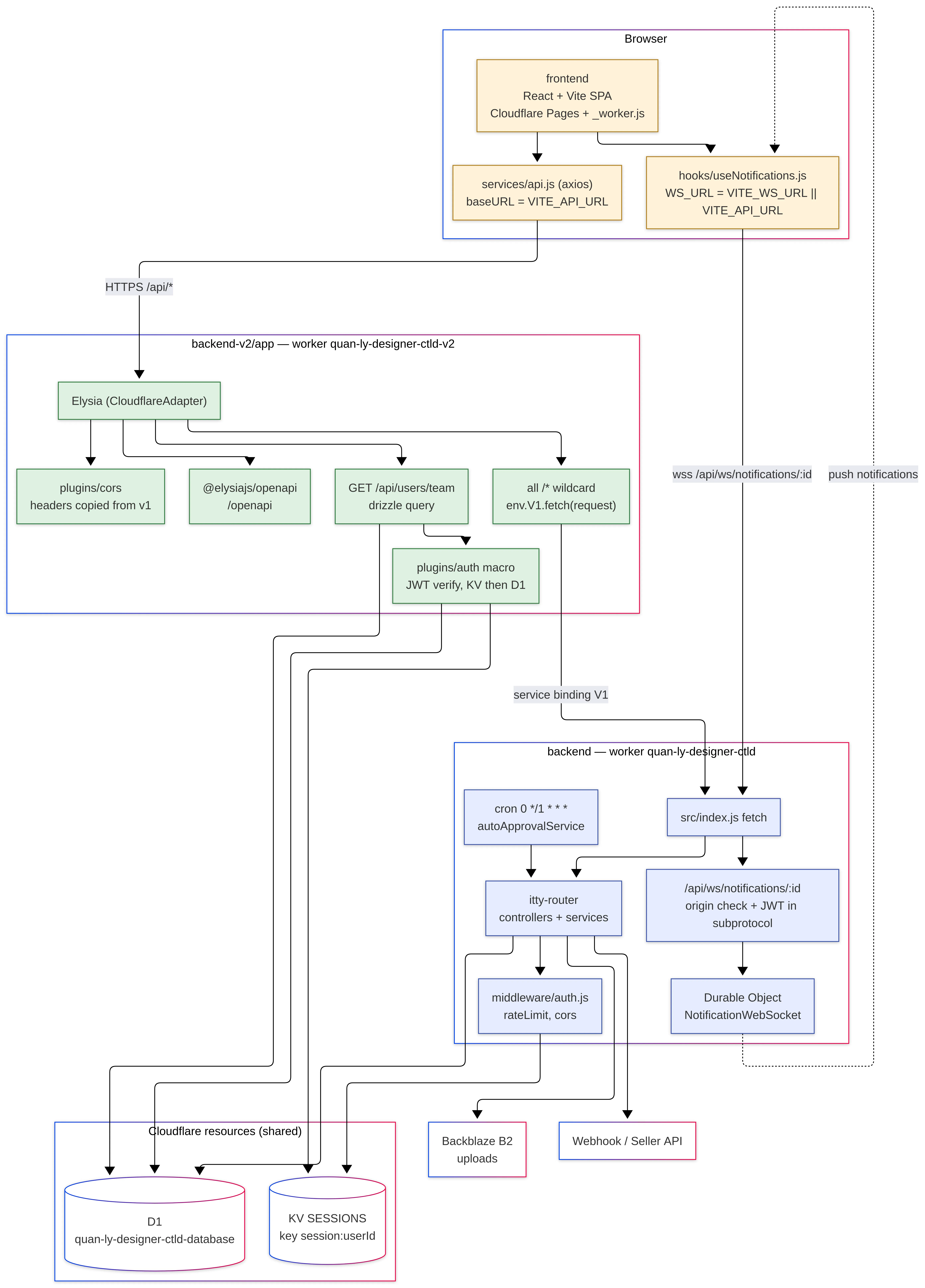
v1 keeps running untouched. Clients only ever talk to v2. No dual routing in the frontend, no path list in a CDN rule.
1. Bind v1 into v2
Service bindings are worker to worker calls inside Cloudflare. No public internet hop, no extra latency, no auth headers to manage.
# wrangler.toml (v2 app)
name = "my-api-v2"
main = "src/index.ts"
compatibility_date = "2026-01-01"
compatibility_flags = ["nodejs_compat"]

[[services]]
binding = "V1"
service = "my-api-v1"

[[d1_databases]]
binding = "DB"
database_name = "my-api"
database_id = "..."

[env.staging]
name = "my-api-v2-staging"

[[env.staging.services]]
binding = "V1"
service = "my-api-v1-staging"
Type it so env.V1 is not any:
// src/env.d.ts
declare module "cloudflare:workers" {
  interface Env {
    DB: D1Database;
    V1: Fetcher;
    JWT_SECRET: string;
    AUTH_V2?: string;
  }
}
2. The root app and the wildcard
The wildcard must be registered last. Everything above it wins, everything below it does not exist.
// src/index.ts
import { Elysia, status } from "elysia";
import { CloudflareAdapter } from "elysia/adapter/cloudflare-worker";
import { env } from "cloudflare:workers";
import { cors, stripCors } from "./plugins/cors";
import { usersRoutes } from "./routes/users";
import { authRoutes } from "./routes/auth";

const VERSION = "2.0.3";

const app = new Elysia({ adapter: CloudflareAdapter })
  .use(cors)
  .use(usersRoutes)                       // migrated
  .get("/", () => ({ status: "ok", version: VERSION }));

// Temporary flag, remove later. The end state is a plain .use(authRoutes)
if (env.AUTH_V2 === "on") app.use(authRoutes);

export default app
  .all("/*", async ({ request }) => {
    try {
      return stripCors(await env.V1.fetch(request));
    } catch (error) {
      console.error("V1 proxy error:", error);
      return status(502, { error: "Upstream service unavailable" });
    }
  })
  .compile();
3. One resource, 3 files
Keep every migrated resource in the same shape. Boring is the point.
src/routes/users/
  index.ts   controller: auth, role checks, status codes
  model.ts   validation schemas only
  repo.ts    SQL only
// src/routes/users/repo.ts
import type { Db } from "../../db";
import { users } from "../../db/schema";
import { eq } from "drizzle-orm";
export const findByEmail = (db: Db, email: string) =>
db.select().from(users).where(eq(users.email, email)).get();// src/routes/users/model.ts
import { Elysia, t } from "elysia";
export const userModel = new Elysia({ name: "users.model" }).model({
"user.create": t.Object({
email: t.String({ format: "email" }),
name: t.String({ minLength: 1 }),
}),
});// src/routes/users/index.ts
import { Elysia } from "elysia";
import { auth } from "../../plugins/auth";
import { userModel } from "./model";
import * as repo from "./repo";
export const usersRoutes = new Elysia({ name: "users", prefix: "/api/users" })
.use(auth)
.use(userModel)
.get("/me", ({ user }) => user, { auth: true })
.post("/", ({ body, db }) => repo.create(db, body), { body: "user.create" });Every instance gets a name, so a repeated .use() dedupes instead of
registering the routes twice.
4. Match the old response shape exactly
The new endpoint must return the same body the old one returned, field for field, status for status. Clients cannot tell the difference, so nothing on the frontend has to change during the migration.
// model.ts
export const missingFields = (body: Record<string, unknown>, keys: string[]) => {
  const missing = keys.filter((k) => !body[k]);
  return missing.length ? `Missing required fields: ${missing.join(", ")}` : null;
};
// index.ts
.post("/login", ({ body, db }) => {
const err = missingFields(body, ["email", "password"]);
if (err) return status(400, { success: false, message: err });
// ...
}, { body: t.Object({ email: t.Optional(t.String()), password: t.Optional(t.String()) }) })Ugly? Yes. But the contract is the contract until every client is migrated.
5. The feature flag
AUTH_V2 above is a secret, not a code change. Cut over and roll back without a
deploy:
# cut over
wrangler secret put AUTH_V2 --env staging   # value: on

# roll back
wrangler secret put AUTH_V2 --env staging   # value: off
Locally use .dev.vars, which is read at boot, so restart wrangler after editing:
# backend-v2/app/.dev.vars  (gitignored)
JWT_SECRET=same-as-v1
AUTH_V2=on
This single flag is a testing crutch, not the end state. A real setup keeps a list of endpoints allowed on v2 and checks against it. I plan to delete this flag once the cutover is done, so do not copy it as a pattern.
Verify the flag actually did something. A flag on a service nobody calls is a very quiet no op. Which brings us to the part that wastes the most time.
What actually cost me time
HTTP goes to v2, WebSocket stays on v1. The frontend on Cloudflare Pages had 1 base URL for everything. The v2 worker only fronts the REST API, so the socket client kept pointing at v1. Split the config: an API base URL and a separate socket URL, otherwise the socket connects to a worker that has no upgrade handler.
Know exactly which directory the build runs in. Cloudflare Pages runs the
build from the root directory you configure, and every path in the build settings
is relative to it. The runtime also has to be pinned, so set BUN_VERSION=1.4.0
as an environment variable, or the build picks a version your lockfile does not
match.
The backend has no build command in Pages. Pages builds the frontend only. The worker is deployed by wrangler, not by Pages. Leaving a build command there makes Pages try to build the backend and fail for no reason.
JWT_SECRET must be identical in v1 and v2. Both apps sign and verify the same tokens. A request can start on v2, get proxied to v1, and still has to validate. Different secrets means every proxied request looks unauthenticated, and the error you see looks nothing like a config problem.
Comments